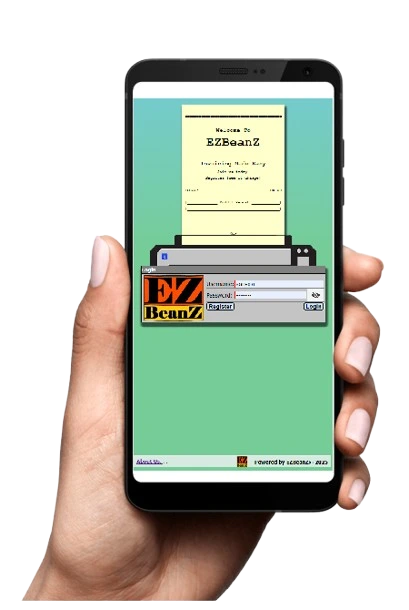
A simple app for invoicing, quotations, statements, order tracking, payment gateways and reporting.
The app can be used on smartphones, tablets and desktops and also offers the ability to communicate with customers via email or WhatsApp.
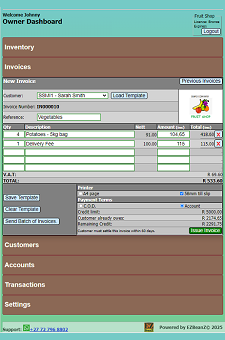
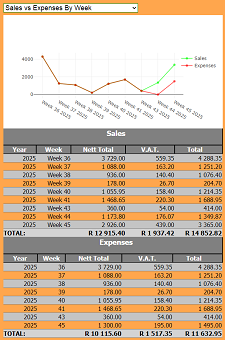
So you can send your customers invoices with payment links and save time collecting money. You can also print or send invoices and statements and easily reconcile customer accounts and then view detailed reports on sales totals and V.A.T. All on the mobile app.
Give Your Customers Many Ways To Pay
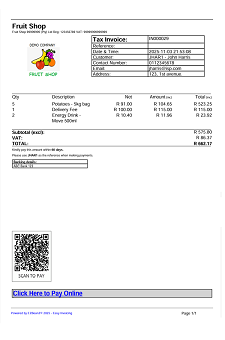
Put QR codes and clickable payment links on the bottom of invoices, quotations and statements.
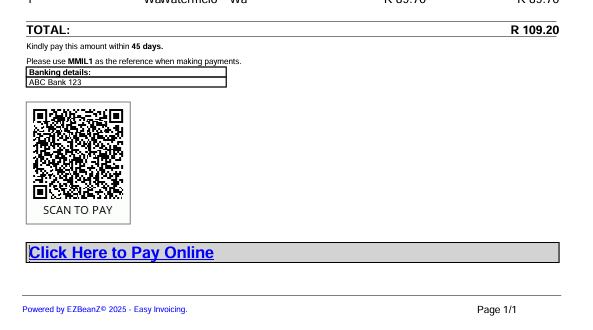
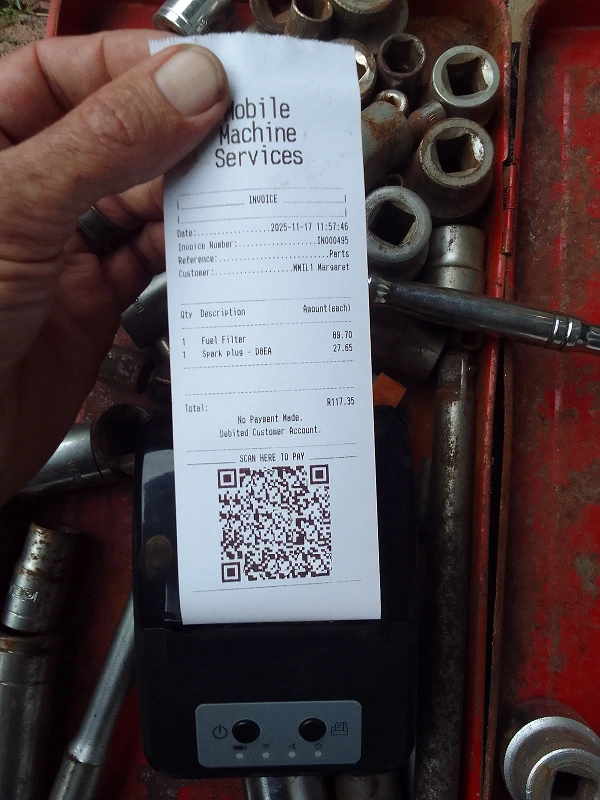
Then the customer scans the QR code or clicks the link to pay online. . .
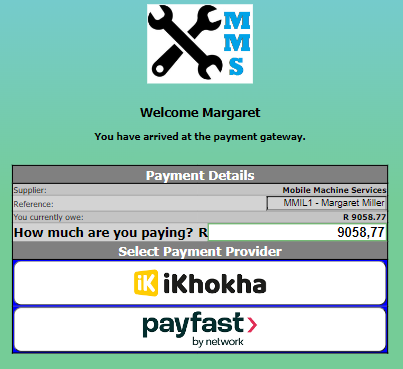
Once configured, your invoices, quotations and statements will each contain a QR code which can be scanned by your customer using any smartphone in order to pay online.
When the QR code is scanned, EZBeanZ recalculates the customer's account balance to include all amounts which are not yet paid before and after that invoice was issued.
Thus encouraging the customer to pay all outstanding amounts.
Clickable payment links are also provided on invoices, quotations and statements with the same function.
Your customers can click to pay or scan to pay. All major credit and debit cards can be accepted as well as Instant EFT and a variety of innovative payment options.
The payment gateway service then deposits the funds into your bank account. When a customer has paid online, EZBeanZ instantly detects the transaction and automatically records it in your transactions table.
This means you don't have to capture the transaction manually.
Your payment gateway is linked to your company and will display your company logo.
Supported payment providers include PayPal, PayFast and iKhokha which accept a wide variety of cards and other payment methods.

PayPal integration as a payment method for your customers. On invoices, statements and via WhatsApp.
EZBeanZ can integrate with your PayPal account, allowing you to sell your products and services all over the world. Your customers can pay you with US Dollars and you can receive the funds in your currency of choice.
When you create an invoice, quotation or statement, or when you send a payment link to a customer using WhatsApp, the QR codes and links allow your customer to pay using PayPal, a widely trusted payment provider.
 |
Track Your Orders
The business owner and customer both have a live order tracking screen. The owner of the business can view a live page showing all of the orders that your customers are placing. This also shows the account of each customer and states whether that customer has paid for the order. This helps the owner control which orders can be released.
Similarly, The customer can view a page showing their order details while it is being prepared. The page also allows the customer to pay for the order online using their credit or debit card. They can access this page by scanning their tracking QR code or clicking on their tracking link. This allows customers to view their order and make payment while sitting at your restaurant, standing in your shop, or from home, anywhere in the world.
Below is an example of each page:
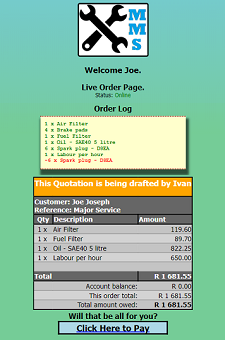
for the manager/owner to see. 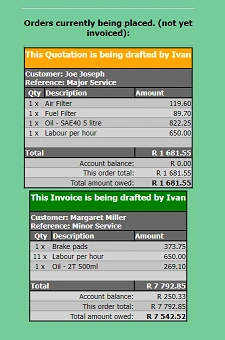
If you are using this feature, you may also connect a Bluetooth slip printer. If you have enabled printing of live orders, the printer can be placed in your warehouse or kitchen. Whenever an item is added to an invoice, the printer will print a line with the description and quantity. This allows preparation of orders while the order is still being placed.
This is useful in restaurants because the order will print or display live in the kitchen while the waiter is taking down an order. That means the kitchen can begin preparation immediately and the waiter can move on to the next table without having to 'shout' the order to the kitchen.
In a warehouse or wholesale business. The customer may be present or not, but will be able to see the order being placed and make payment online, from anywhere.
Scheduled Invoices
Would you like to send invoices automatically on a monthly or weekly schedule?
EZBeanZ has the answer.
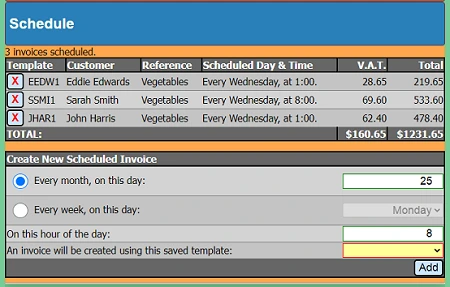
Our schedule tool is ideal for businesses that send the same invoice to their customers on a recurring basis. Simply select the day of the month or week, the time, select a customer and click add. Then the same invoice will be sent on the same day of every month or week.
G.P.S. Order Tracking
Share tracking links with your customers to let them follow their orders with a map online. The customer's order tracking screen provides the latest G.P.S. co-ordinates of the person responsible for the order. As well as the current status such as 'Waiting for collection' or 'Collected by driver'.
Tracking links can be shared with customers via WhatsApp. Or by scanning the QR tracking code with any smart-device. The order tracking screen also allows the customer to make payment for the order online.
The business owner or manager can view all orders which are being placed as well as their current G.P.S. locations to ensure that deliveries are running smoothly. This also helps to provide proof of delivery because the location where the driver was last seen with the order is stored in the deliveries table for easy reference. This will be the same as the destination address if the order was delivered correctly. Users have reported that this feature is typically accurate to within 20 metres or less, allowing couriers and customers to find eachother easily.
Printing
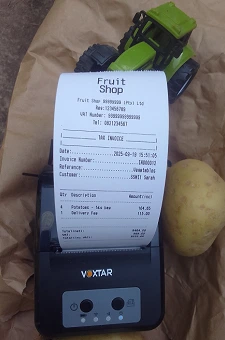
Print A4 and 58mm till slips from your smartphone using a portable thermal printer. Slips are printed with scan-to-pay QR codes allowing your customer to pay by scanning the QR code with their smartphone.
Our printer driver is available to all users allowing you to print invoices and quotations quickly from your Android device or Windows PC.
Your documents remain stored on the cloud so that you may generate reports at the end of each day, week, or month.
58mm thermal printers are very affordable and can be purchased online. Click here to see a list of affordable printers online.
Customer Accounts
EZBeanZ records transactions and produces detailed account statements in PDF format including your company logo, payment instructions, payment link and QR code. As the owner, you can define settlement periods and account limits for each debtor.
These statements can be created and sent automatically. Thus keeping your customers up-to-date with their accounts.
When a payment is made by scanning the QR code, or by clicking on the payment link on the invoice, EZBeanZ automatically captures the payment. Meaning that you don't have to capture it manually.
However, you can also capture payments manually when necessary.
Supplier Accounts
Capture supplier invoices and keep track of how much you owe.
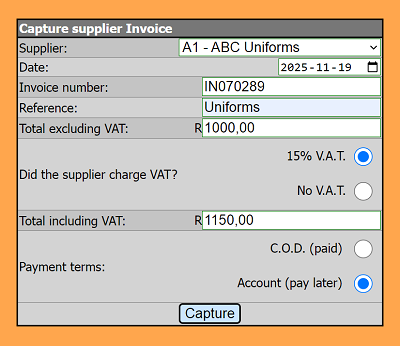
Our reports provide graphs reflecting how much you owe to suppliers compared to how much is owed to you by customers.
example: Accounts Payable vs Accounts Receivable. . .
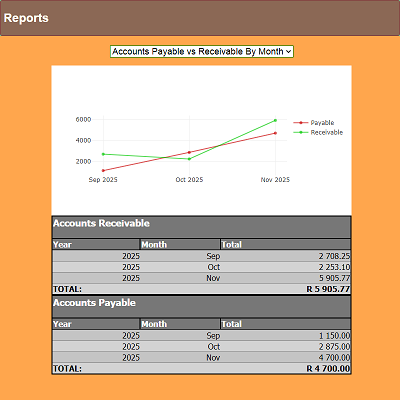
This keeps you up-to-date with supplier accounts and helps to manage cash-flow.
Export Your Data
If you would like to export your data. EZBeanZ makes it easy.
Each table can be downloaded allowing you to export your transactions, invoices, quotations, accounts and inventory at the click of a button. This helps to integrate with other accounting systems.
The files are in comma separated values(*.csv) format, allowing you to open, view and edit them using Microsoft Excel.
This makes EZBeanZ accountant-friendly and widely compatible with other systems used to process financial reports.
V.A.T.
The system caters for NON V.A.T. registered businesses and V.A.T. registered businesses alike. You will be able to produce sales reports reflecting total sales and total V.A.T. charged for any given period.
All calculations are based on your national standard V.A.T. rate.
EZBeanZ also accommodates V.A.T. zero and V.A.T. exempt items.
To learn more about ensuring your tax invoices are compliant, visit this page on the SARS website about tax invoices.
B.Y.O.D.
Save hardware costs by up to 100%. A Bring Your Own Device policy means that as a business owner, you do not need to provide each of your staff with a device. Your employees can login using their own smartphone or tablet.
This significantly reduces setup costs and also reduces risks for the business. Especially in industries where high staff turnover is expected.
A business can save an estimated $341 to $1,300 per employee annually by implementing a Bring Your Own Device (BYOD) policy. For invoicing, these savings come from eliminating hardware costs and saving administrative time by allowing staff to use devices they are already familiar with.
B.Y.O.D. also reduces the risk of robbery and theft because there is no valuable technology in the workplace. This makes your business safer for your customers and your staff. Not to mention the lost income due to business interruptions.
Save costs with a B.Y.O.D. policy
Retail:
No need to purchase a computer, card reader or any sort of cash register. Your staff simply use their phones to scan barcodes and ring-up the sale. Then the payment link is sent to the customer's phone. When the customer has paid, the invoice is sent to them and the goods can be released. You can give your security guards at the exit a link to view all of the orders on their phones to make sure each customer has paid before leaving.
Trade Counters and Dispatch Departments:
No need for a big display screen in the waiting area and no more computers on the counter. The staff take down the orders on their phones and the packing staff prepair the order which they can also see on their phones. Simply give each customer their tracking link and they will be able to see the status of the order and make payment on their phone. Customer interaction also improves dramatically without a monitor on the counter obscuring the salesperson's face. In some cases, such as a showroom, the counter can be done away with completely allowing the sales staff to be more mobile and interactive.
Fast Food and Delivery Services:
Let your customers track the delivery on their phone and stop receiving calls to follow up. Give your customers their order tracking link and allow them to make payment and track their deliveries on a map. No more arguments about the driver not arriving, the deliveries table shows the G.P.S. location where the order was handed over. With EZBeanZ, a delivery business can easily operate without purchasing any P.O.S. hardware such as card readers and computers.
Workshops:
No more pen and paper! Your phone is the only tool you need. When a customer brings their vehicle, add the customer to the system and share the order tracking link on WhatsApp. This will be the live 'jobcard' for the work. Then inspect the vehicle and add the labour and parts to the invoice. While you are doing this, the customer can see the running total on their phone. If the customer agrees to the work, they can make payment on their phone and you can proceed. If you encounter extra work or extra parts needed, add them to the invoice and your customer will see the updated total. You may ask for further payment at this stage. This allows your customer to make the payments using their credit card before they return to collect the vehicle. Then create the final invoice and it will automatically be sent to the customer as a PDF.
Restaurants and Hotels:
When a guest arrives, the host adds them to the system with only their first name and phone number. The delivery address will be the name of the table or the room number. Then the host shares the order tracking link with them on WhatsApp and starts taking the order using the app on his/her phone. The guest can see the running total by looking at the tracking screen on their own phone. When they are ready to leave, the guest can make payment through the same app and the host will be able to see that the account has been settled. The guest can also pay an extra amount allowing the waiter to get a tip.
School Tuck Shops:
Parents and guardians can load funds onto the learner's account. Then the learner can make purchases at the tuck shop until the amount is depleted. The parent or guardian can view their order tracking page to see what has been purchased and make a payment to top-up the account. This allows for a cashless schooling environment, improving the safety of learners and teachers.
Read more about B.Y.O.D. on Wikipedia . . .
What do you need to get started?
If you can read this page, you already have the minimum hardware requirements.
Hardware Requirements: | |
|---|---|
| 1. | Any mobile device or P.C. |
| 2. | If you intend to print documents, we recommend using a Bluetooth enabled 58mm thermal printer or any A4 printer (printing is optional).
Our drivers support printing of till slips through Android and Windows. |
| 3. | Internet coverage. Your mobile device or PC must have internet access. |
EZBeanZ is ideal for mobile businesses because it requires no cable connections when a Bluetooth printer is used. | |
EZBeanZ Product Summary
Product | Features | Price |
|---|---|---|
| EZBeanZ - Bronze License | All essential features required for a small enterprize, limited to 1 user and 100 invoices per month. | Free, forever |
| EZBeanZ - Silver License | Additional features included for medium-size enterprizes, limited to 10 users and 1000 invoices per month. | $49 (USD) per year |
| EZBeanZ - Gold License | All features included. Suitable for large enterprizes, limited to 20 users and 5000 invoices per month. | $99 (USD) per year |
To see a full list of product features go to the License Options Page. | ||